
Note
Go to the end to download the full example code.
Fitting Simulated Data#
This is a file to show a very basic fitting of data where the model are generated in a different space (photon-space) which are converted using a square response matrix to the data-space (count-space).
Note
Caveats:
The response is square so the count and photon energy axes are identical.
No errors are included in the fitting statistic.
import matplotlib.pyplot as plt
import numpy as np
from matplotlib.colors import LogNorm

from astropy.modeling import fitting

from sunkit_spex.data.simulated_data import simulate_square_response_matrix
from sunkit_spex.fitting.objective_functions.optimising_functions import minimize_func
from sunkit_spex.fitting.optimizer_tools.minimizer_tools import scipy_minimize
from sunkit_spex.fitting.statistics.gaussian import chi_squared
from sunkit_spex.models.instrument_response import MatrixModel
from sunkit_spex.models.models import GaussianModel, StraightLineModel
Start by creating simulated data and instrument. This would all be provided by a given observation.
Can define the photon energies
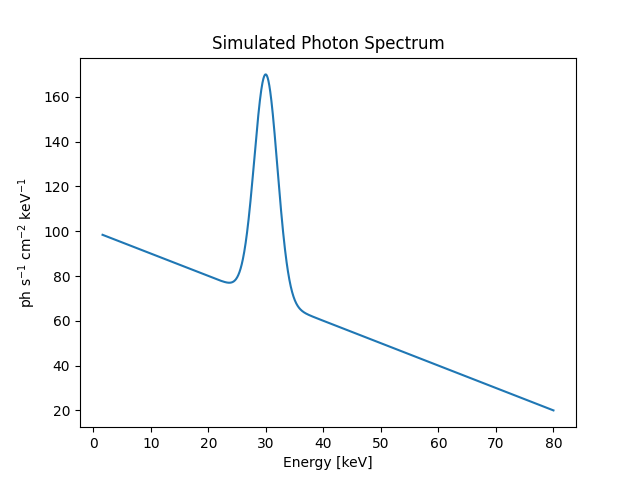
Let’s start making a simulated photon spectrum
sim_cont = {"edges": False, "slope": -1, "intercept": 100}
sim_line = {"edges": False, "amplitude": 100, "mean": 30, "stddev": 2}
# use a straight line model for a continuum, Gaussian for a line
ph_model = StraightLineModel(**sim_cont) + GaussianModel(**sim_line)

plt.figure()
plt.plot(ph_energies, ph_model(ph_energies))
plt.xlabel("Energy [keV]")
plt.ylabel("ph s$^{-1}$ cm$^{-2}$ keV$^{-1}$")
plt.title("Simulated Photon Spectrum")
plt.show()
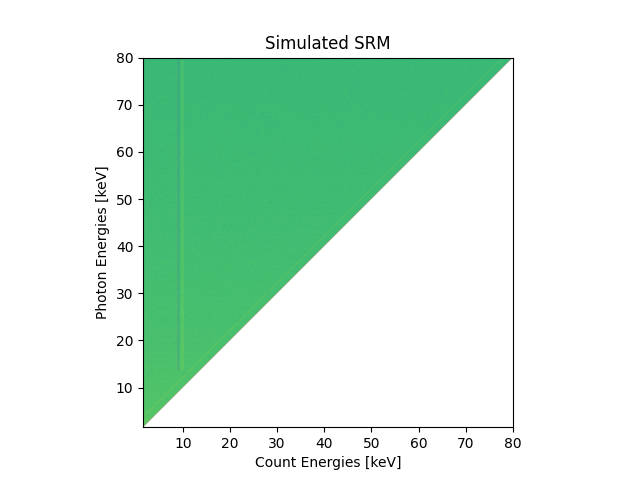
Now want a response matrix
srm = simulate_square_response_matrix(ph_energies.size)
srm_model = MatrixModel(matrix=srm)

plt.figure()
plt.imshow(
    srm, origin="lower", extent=[ph_energies[0], ph_energies[-1], ph_energies[0], ph_energies[-1]], norm=LogNorm()
)
plt.ylabel("Photon Energies [keV]")
plt.xlabel("Count Energies [keV]")
plt.title("Simulated SRM")
plt.show()
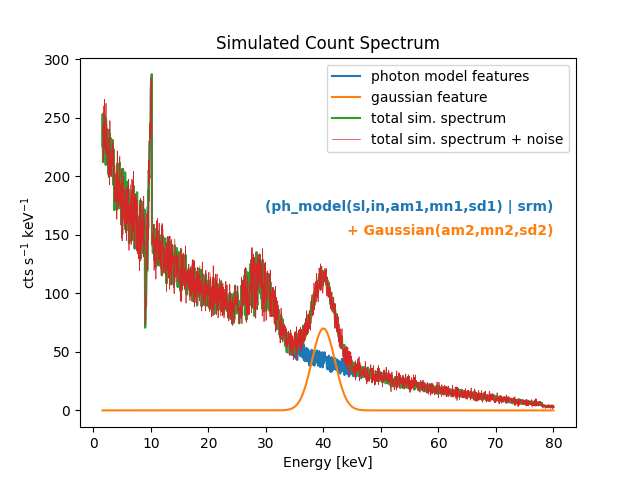
Start work on a count model
sim_gauss = {"edges": False, "amplitude": 70, "mean": 40, "stddev": 2}
# the brackets are very necessary
ct_model = (ph_model | srm_model) + GaussianModel(**sim_gauss)
Generate simulated count data to (almost) fit
Add some noise
np_rand = np.random.default_rng(seed=10)
sim_count_model_wn = sim_count_model + (2 * np_rand.random(sim_count_model.size) - 1) * np.sqrt(sim_count_model)
Can plot all the different components in the simulated count spectrum
plt.figure()
plt.plot(ph_energies, (ph_model | srm_model)(ph_energies), label="photon model features")
plt.plot(ph_energies, GaussianModel(**sim_gauss)(ph_energies), label="gaussian feature")
plt.plot(ph_energies, sim_count_model, label="total sim. spectrum")
plt.plot(ph_energies, sim_count_model_wn, label="total sim. spectrum + noise", lw=0.5)
plt.xlabel("Energy [keV]")
plt.ylabel("cts s$^{-1}$ keV$^{-1}$")
plt.title("Simulated Count Spectrum")
plt.legend()

plt.text(80, 170, "(ph_model(sl,in,am1,mn1,sd1) | srm)", ha="right", c="tab:blue", weight="bold")
plt.text(80, 150, "+ Gaussian(am2,mn2,sd2)", ha="right", c="tab:orange", weight="bold")
plt.show()
Now we have the simulated data, let’s start setting up to fit it
Get some initial guesses that are off from the simulated data above
guess_cont = {"edges": False, "slope": -0.5, "intercept": 80}
guess_line = {"edges": False, "amplitude": 150, "mean": 32, "stddev": 5}
guess_gauss = {"edges": False, "amplitude": 350, "mean": 39, "stddev": 0.5}
Define a new model since we have a rough idea of the mode we should use
ph_mod_4fit = StraightLineModel(**guess_cont) + GaussianModel(**guess_line)
count_model_4fit = (ph_mod_4fit | srm_model) + GaussianModel(**guess_gauss)
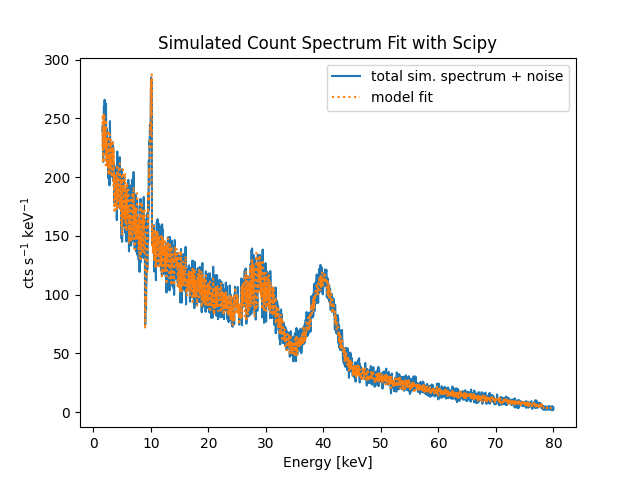
Let’s fit the simulated data and plot the result
opt_res = scipy_minimize(
    minimize_func, count_model_4fit.parameters, (sim_count_model_wn, ph_energies, count_model_4fit, chi_squared)
)

plt.figure()
plt.plot(ph_energies, sim_count_model_wn, label="total sim. spectrum + noise")
plt.plot(ph_energies, count_model_4fit.evaluate(ph_energies, *opt_res.x), ls=":", label="model fit")
plt.xlabel("Energy [keV]")
plt.ylabel("cts s$^{-1}$ keV$^{-1}$")
plt.title("Simulated Count Spectrum Fit with Scipy")
plt.legend()
plt.show()
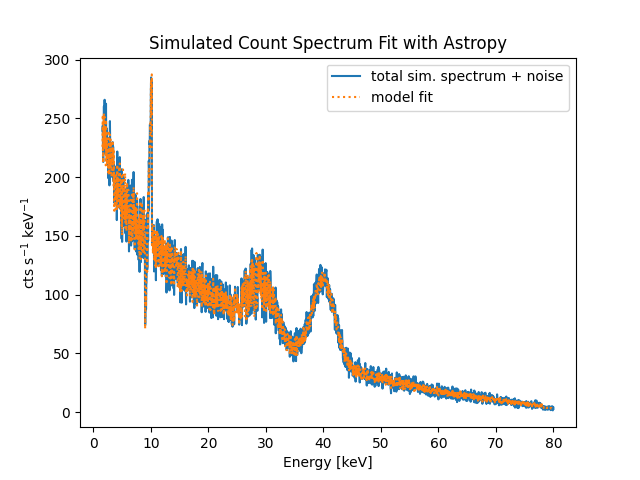
Now try and fit with Astropy native fitting infrastructure and plot the result
Try and ensure we start fresh with new model definitions
ph_mod_4astropyfit = StraightLineModel(**guess_cont) + GaussianModel(**guess_line)
count_model_4astropyfit = (ph_mod_4fit | srm_model) + GaussianModel(**guess_gauss)

astropy_fit = fitting.LevMarLSQFitter()

astropy_fitted_result = astropy_fit(count_model_4astropyfit, ph_energies, sim_count_model_wn)

plt.figure()
plt.plot(ph_energies, sim_count_model_wn, label="total sim. spectrum + noise")
plt.plot(ph_energies, astropy_fitted_result(ph_energies), ls=":", label="model fit")
plt.xlabel("Energy [keV]")
plt.ylabel("cts s$^{-1}$ keV$^{-1}$")
plt.title("Simulated Count Spectrum Fit with Astropy")
plt.legend()
plt.show()
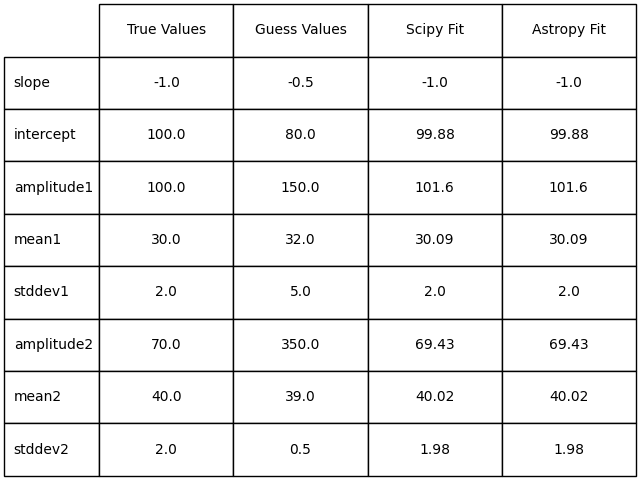
Display a table of the fitted results
plt.figure(layout="constrained")


row_labels = (
    tuple(sim_cont)[-2:] + tuple(f"{p}1" for p in tuple(sim_line)[-3:]) + tuple(f"{p}2" for p in tuple(sim_gauss)[-3:])
)
column_labels = ("True Values", "Guess Values", "Scipy Fit", "Astropy Fit")
true_vals = np.array(tuple(sim_cont.values())[-2:] + tuple(sim_line.values())[-3:] + tuple(sim_gauss.values())[-3:])
guess_vals = np.array(
    tuple(guess_cont.values())[-2:] + tuple(guess_line.values())[-3:] + tuple(guess_gauss.values())[-3:]
)
scipy_vals = opt_res.x
astropy_vals = astropy_fitted_result.parameters

print(np.shape(scipy_vals))
print(np.shape(astropy_vals))
print(np.shape(true_vals))
print(np.shape(guess_vals))

cell_vals = np.vstack((true_vals, guess_vals, scipy_vals, astropy_vals)).T
cell_text = np.round(np.vstack((true_vals, guess_vals, scipy_vals, astropy_vals)).T, 2).astype(str)

plt.axis("off")
plt.table(
    cellText=cell_text,
    cellColours=None,
    cellLoc="center",
    rowLabels=row_labels,
    rowColours=None,
    colLabels=column_labels,
    colColours=None,
    colLoc="center",
    bbox=[0, 0, 1, 1],
)

plt.show()
(8,)
(8,)
(8,)
(8,)
Total running time of the script: (0 minutes 1.339 seconds)